Member Bite 01: Let Your Team Recognize You
TEAMRBS MEMBER BITES • 01
Community first. Small actions. Shared growth.
One bite. One useful action. ID: TRBS-MB-01
Your presence matters. Give your teammates a name and face they can recognize.
Your bite
Update your profile name and photo.
Here’s why
We are building relationships, not collecting usernames. A recognizable profile helps teammates know who is posting, responding, and offering support.
Do this — Website
1. Log in to TeamRBS.com. Tap your member name or profile photo to open the member menu, then choose Profile. On iPad, the menu is at the top right. On iPhone, it is in the member bar below the site header.
2. Open Edit Profile. On iPhone, look below your join date for the Edit Profile link. On iPad, tap the three dots (⋮) on the right side of the blue profile banner, then choose Edit Profile.
3. Under Display info, change Display name to the name you want teammates to recognize. Use your first and last name if you are comfortable sharing them. This section says the information is visible to all members of this site.
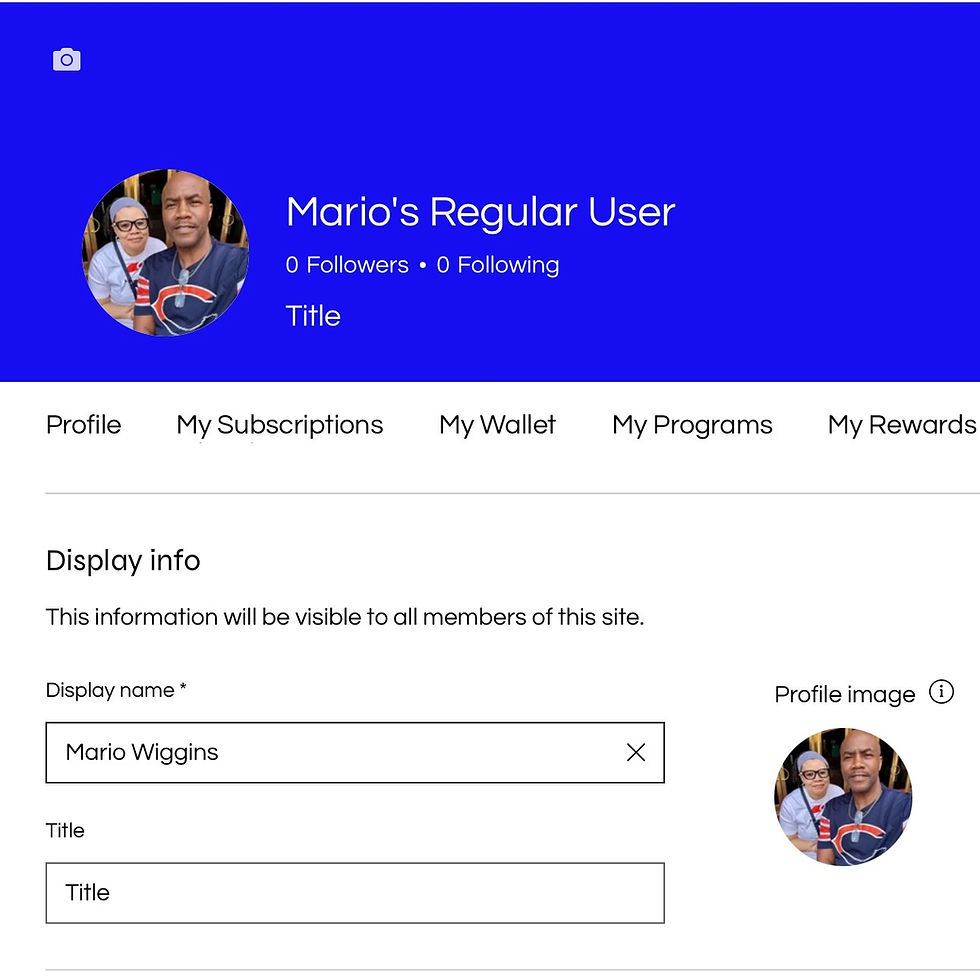
The name is entered above, but the profile banner can still show the previous name before you save.
4. To change your profile photo, tap your round profile photo and its camera icon. Choose Photo Library, select a clear photo, and tap the blue check mark to confirm your selection. Use the round profile photo rather than the separate camera icon for the cover banner.
5. Tap Update Info to save your name changes. In our iPhone test, the photo change showed Profile image changed, and saving the account changes showed Info updated.
6. Return to your profile and check your name and photo. If the member menu at the top still shows the old information, refresh the page and check again.
You’re done when
Your chosen name and photo appear on your profile. After refreshing, check that the member menu also shows your updated information.

Finished result: the saved name appears in both the profile banner and the Display name field.
If you get stuck
If you cannot find the editing option, contact mwiggins@teamrbs.com. Tell us which device you are using and where you stopped. Never send your password.
A recognizable profile is not proof of identity. Share only what you are comfortable making visible to others. Your profile display name is also separate from your account/contact details.
Your next bite
Choose what reaches your inbox.
Learn Better. Do Better. Support Better.

Comments